
SEO
Lighthouse and Core Web Vitals: what the numbers mean and what moves them
Lighthouse measures in the lab, Core Web Vitals measure real users. Here is the difference, the three thresholds, the errors I find most often, and what took my own site from 75 to 98.
 Michael Kirkegaard
Speed is the SEO subject where most people spend the most hours for the smallest return. Not because it is irrelevant, but because the numbers get misunderstood. The Lighthouse score is not what Google measures. Core Web Vitals are. Here is the difference, and what moves them.
Lighthouse and Core Web Vitals are two different things
Lighthouse is a tool. It lives in Chrome under DevTools, it powers PageSpeed Insights, and it simulates a slow phone on a poor connection and gives a score from 0 to 100. It is lab data: same test, same conditions, every time. Good for finding causes. Poor at describing reality.
Core Web Vitals are three measurements Google collects from real Chrome users visiting your site. That is field data, and it is what feeds Google’s assessment of page experience. You find them in Search Console under Experience and at the top of PageSpeed Insights, if the site has enough traffic for them to appear.
A page can score 95 in Lighthouse and still fail Core Web Vitals, because real users hold older phones than the simulator. The reverse happens too. So: use field data to decide whether there is a problem, and Lighthouse to work out why.
The three metrics and their thresholds
LCP, Largest Contentful Paint. How long it takes before the largest element above the fold is painted. Usually the hero image or the headline. The threshold for “good” is 2.5 seconds.
INP, Interaction to Next Paint. How long it takes from the user tapping something until the screen responds. The threshold is 200 milliseconds. INP replaced FID in 2024 and is stricter, because it measures every interaction on the page, not only the first.
CLS, Cumulative Layout Shift. How much the content jumps while the page loads. The threshold is 0.1. It is the number behind the irritation of aiming for a link and having an ad push it away at the last moment.
Google assesses the 75th percentile. Three out of four visits have to be under the threshold before a page passes. That means one slow customer ruins nothing, but a systematic problem on mobile does.
How I run Lighthouse
In Chrome: DevTools, the Lighthouse tab, mobile, only the Performance category, and run it in an incognito window so extensions do not interfere. Run it three times and take the median, because the score fluctuates. On the command line I use npx lighthouse <url>, which gives a JSON file that can be compared week to week. That is the version I use when a site has to be measured before and after a change, because eyeballing lies.
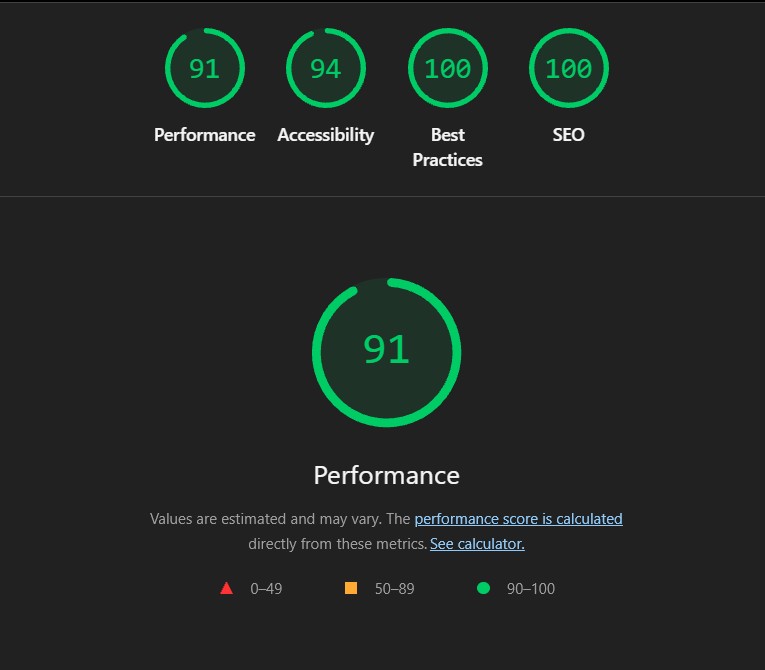
Do not look at the score first. Look at the Diagnostics section and at the element Lighthouse has identified as LCP. That answers the only question that matters: what is the page waiting for?
The errors I find most often
Embeds and iframes that load immediately. Instagram, YouTube, LinkedIn, maps. Each embed fetches its own script and its own CSS, often several hundred kilobytes, and it happens before your own content is painted. The fix is to wait with the embed until it is near the screen, or to show an image with a play button and only fetch the iframe on click.
Full-size images. A 2,000-pixel hero image sent to a phone with a 390-pixel screen. Use WebP or AVIF, make three sizes, and let the browser choose with srcset. Set fetchpriority="high" on the one image that is the LCP, and loading="lazy" on everything below the fold.
Third-party fonts. Google Fonts requires a lookup to a new server, then a CSS fetch, then the font files. The headline cannot be painted until that is done. Put the font files on your own domain, use preload, and write font-display: swap.
Blur effects and heavy filters. filter: blur() on large elements costs style and layout time on every frame on mobile processors. A radial gradient looks almost identical and costs nothing.
Scripts that load first. Chat widgets, marketing tags and heatmaps do not need to be ready before the hero image. Defer them until after load, ideally with a few seconds of delay. They measure the same, the user notices no difference, and LCP wins.
Layout shifts. Images without width and height, fonts that change size on load, banners pushed in at the top. Reserve the space before the content arrives.
What it did on my own site
When I went through my own homepage in September 2026, it scored 75 on mobile with an LCP of 14.6 seconds. The cause was six Instagram embeds in a carousel, all fetching Instagram’s script on page load. After deferred embeds, WebP images with srcset, self-hosted fonts, gradients instead of blur, and a marketing script moved to after load, the homepage sits at 98 with an LCP of 1.8 seconds. The page did not get less rich. It just got the right order.
When speed ranks
Page experience is not a primary ranking factor, and Google has said so clearly: content and relevance beat speed. But in a search where two pages answer equally well, page experience can decide the order. And outside of rankings it matters every day: faster pages convert better, cost less in advertising because quality score rises, and get crawled more. That is why speed is always on my technical SEO checklist, but never at the top.
My routine
New pages: Lighthouse on mobile before publishing, target 95 or above on pages that have to rank. Homepages may be richer and land lower, they do not have to rank for keywords. Every month: the Core Web Vitals report in Search Console. If a group of URLs is in yellow or red, I open one of them in Lighthouse, find the cause, and fix the pattern, not the page.
Related service
SEO you can see on the bottom line
Run into a term along the way? Look it up in the marketing dictionary, with plain explanations of more than 400 marketing terms.