
SEO
Google Search Console: how I read the numbers before touching a site
Search Console is Google's own data on your site. Here is how I set it up, read the Performance report, find the easy wins and catch indexing errors before they cost traffic.
 Michael Kirkegaard
Ahrefs and Semrush estimate. Google Search Console knows. It is the only tool that shows what Google has seen, indexed and shown to real people, and it is free. It is also the tool I most often find set up once and never opened again. Here is how I use it.
What Search Console is, and what it is not
Search Console is Google’s report to the site owner. It tells you which searches your pages appeared for, how often they were clicked, which pages Google has indexed, and where there are technical problems. It does not tell you what competitors get in traffic, and it only keeps 16 months of data. So it does not replace Ahrefs, but it is the truth everything else has to be checked against.
Getting started: verification and sitemap
Choose a domain property, not a URL prefix. The domain property combines http, https, www and non-www in one view, so you do not have to add four reports together. Verification happens with a TXT record in DNS, and that record has to stay. Delete it and you lose access, which you typically discover on the day you need the data.
Submit the sitemap under Sitemaps right away. Not to get pages indexed faster, it rarely does that, but because the Pages report can then distinguish between “pages you want indexed” and “pages Google found on its own”. That distinction is half of all troubleshooting.
The Performance report: the four numbers
Performance is the report I look at every week. Four numbers: impressions, clicks, click-through rate and average position.
Impressions tell you whether Google shows you at all. If they rise without clicks following, you are being shown for searches you do not yet rank well enough on to earn the click.
Clicks are the number the client pays for. Everything else is intermediate arithmetic.
Click-through rate exposes title tags and meta descriptions that do not sell. A page in position 3 with a low click-through rate has a copy problem, not a ranking problem.
Average position needs care. It is an average across every search a page appeared for, so an article can sit at number 2 for its main keyword and number 40 for twenty random searches, and the report shows 15. Filter to one keyword at a time when it has to be used for anything.
How I find the easy wins
The most profitable hour in Search Console is this one: filter Performance to the last three months, sort queries by impressions, and find those with an average position between 5 and 15. These are searches Google already considers you relevant for, where you sit at the bottom of page one or the top of page two. New content is rarely needed. What is needed is a better title, a paragraph that answers the search precisely, a few internal links from stronger pages, and often an update date that is not three years old.
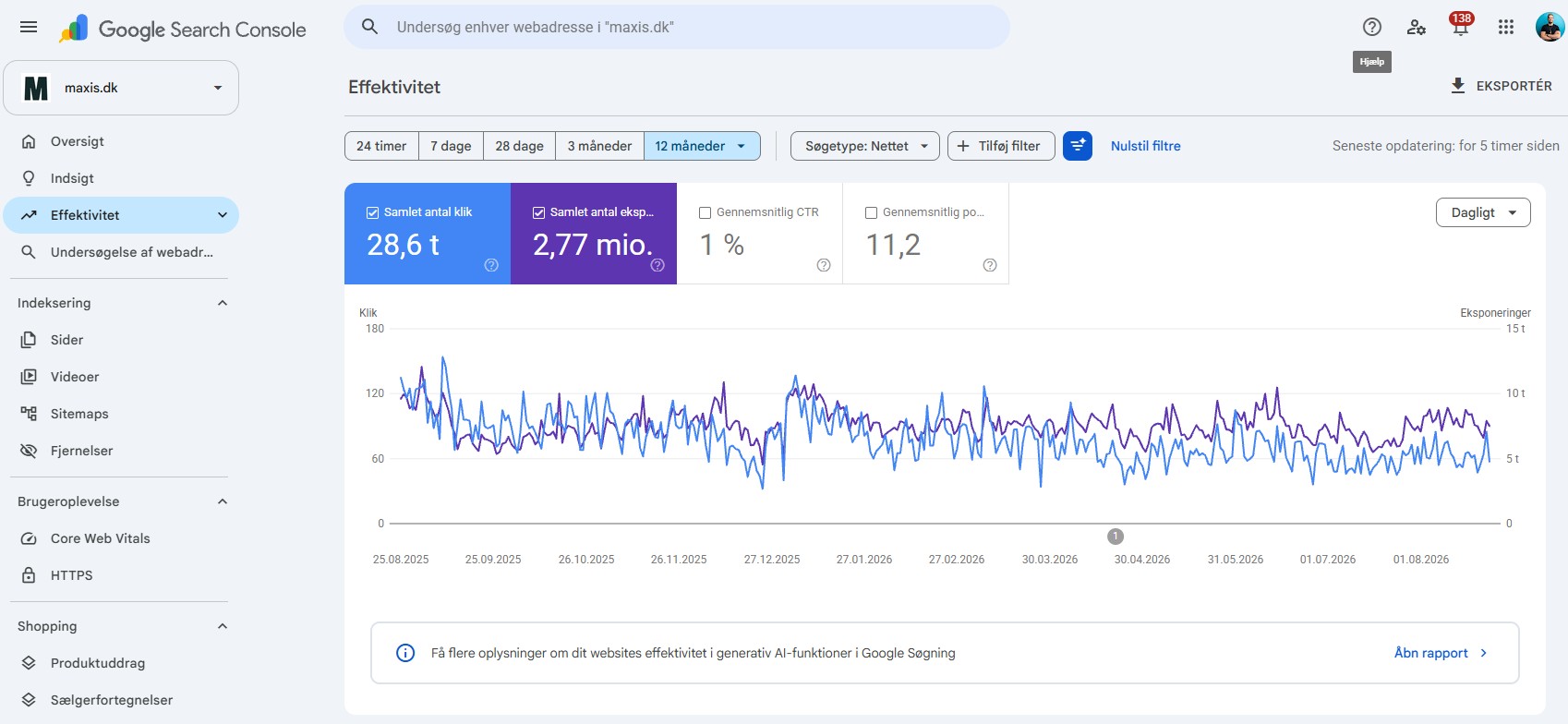
Next filter: pages with many impressions and a click-through rate below what the position should give. Rewrite title and description, wait three weeks, compare. It is the fastest A/B test in SEO, and it costs nothing.
Indexing: pages that are not in
The Pages report shows why URLs are not indexed. Most reasons are harmless: redirects, canonical duplicates, pages you set to noindex yourself. Two lines deserve attention.
“Crawled, currently not indexed” means Google has seen the page and chosen to leave it out. That is a quality signal. The pages are typically thin, nearly identical to others, or without internal links. The fix is to make the page better or merge it with another, not to request indexing again and again.
“Discovered, currently not crawled” means Google knows the URL but does not prioritise fetching it. On large webshops this is often a crawl budget problem: too many filter pages, too many parameters, too many long redirect chains. A crawl with Screaming Frog helps find the pattern.
Core Web Vitals and HTTPS
Under Experience you find Core Web Vitals as field data from real Chrome users. Those are the numbers that count for Google, not the Lighthouse score you run yourself in DevTools. If a group of URLs is marked “Poor”, start there and use Lighthouse to find the cause. I have written a separate guide to Lighthouse and Core Web Vitals, because it is a subject of its own.
What Search Console does not tell you
Data arrives with roughly two days of delay, so a change made yesterday cannot be measured today. The interface shows at most 1,000 rows per table, so on large sites the data has to come out through the API or into Looker Studio before you can see the whole picture. And very low-volume queries are anonymised, so the sum of clicks in the query table is always lower than total clicks. That is not a bug, it is privacy protection.
My routine
Every week: Performance, last 28 days against the previous 28, sorted by difference in clicks. It shows what is starting to fall while it can still be saved. Every month: the Pages report for new errors, and the position 5 to 15 list. Every quarter: compare with Ahrefs and see where the estimates were wrong. That is the whole setup, and it is a fixed part of every SEO audit I do.
Related service
SEO you can see on the bottom line
Run into a term along the way? Look it up in the marketing dictionary, with plain explanations of more than 400 marketing terms.